AI-Natural Language Search

An exploratory Eventbrite initiative to evaluate how conversational AI could help support search and improve discovery without disrupting user behavior.

Problem

The main users of Eventbrite, Social Scouts, love to plan and use Eventbrite events to hang out with friends, meet new people, and experience new things. In their discovery process, they often look for personalized inspiration, not just the most popular event.


In our research and qualitative data, we learned that while Social Scouts value discovery, they struggle to express what they’re looking for using traditional search tools:


  • Filtering and sorting seemed “rigid”, and didn’t always translate to what was intended.
  • Users iterated through multiple searches, applied what filtering we had, changed location - there was clear intent to running multiple queries to finding an event match.

Users wanting to find more personalized events counted for almost half of all comments about Eventbrite’s discovery surfaces.

Defining the Experiment

Our search team regularly operated in the world of A/B test experiments. Our team strategized together in working sessions - tweaking ideas, hypotheses, and I would show proposed designs. Given our knowledge of Social Scouts and their search/browse behaviors, we felt comfortable in coming up with the following hypotheses for the project:

  • IF we utilize LLMs and AI to power a more inspiring, flexible and conversational search experience THEN users will be better guided toward finding a great event BECAUSE they will have the ability to express their intent and increased confidence in finding the right event.


This would be our north star throughout the initiative.

Explorations

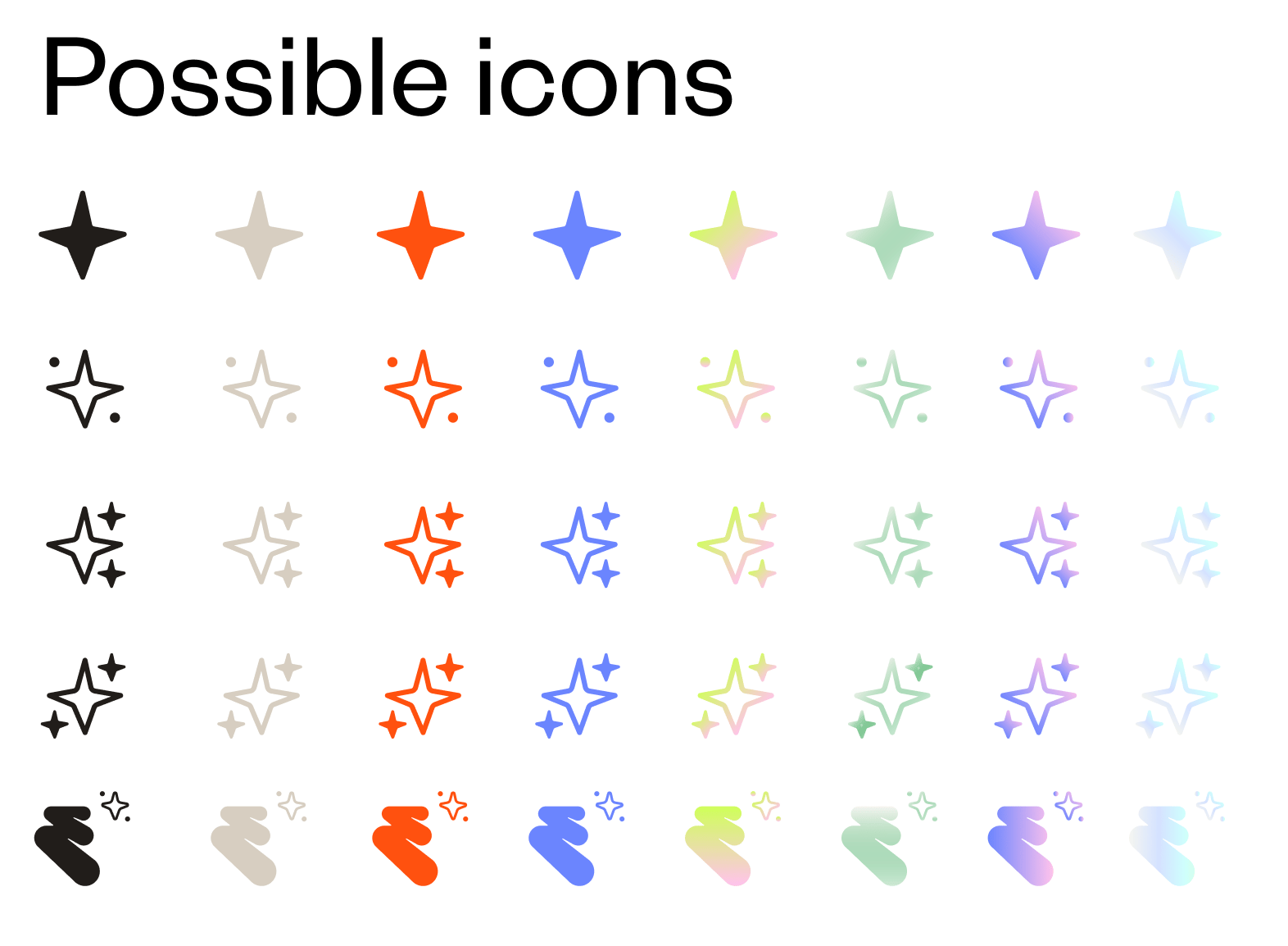
I needed to explore many things to get the team in position to test. The chat needed colors, an icon, an entry point, a comparative chat feature audit, and the chat design experience. I broke down each step from within Figma and got exploring.

Chat feature audit
Example 1 of music lineup exploration. Shows 2 headliners and a small treatment for other artists.

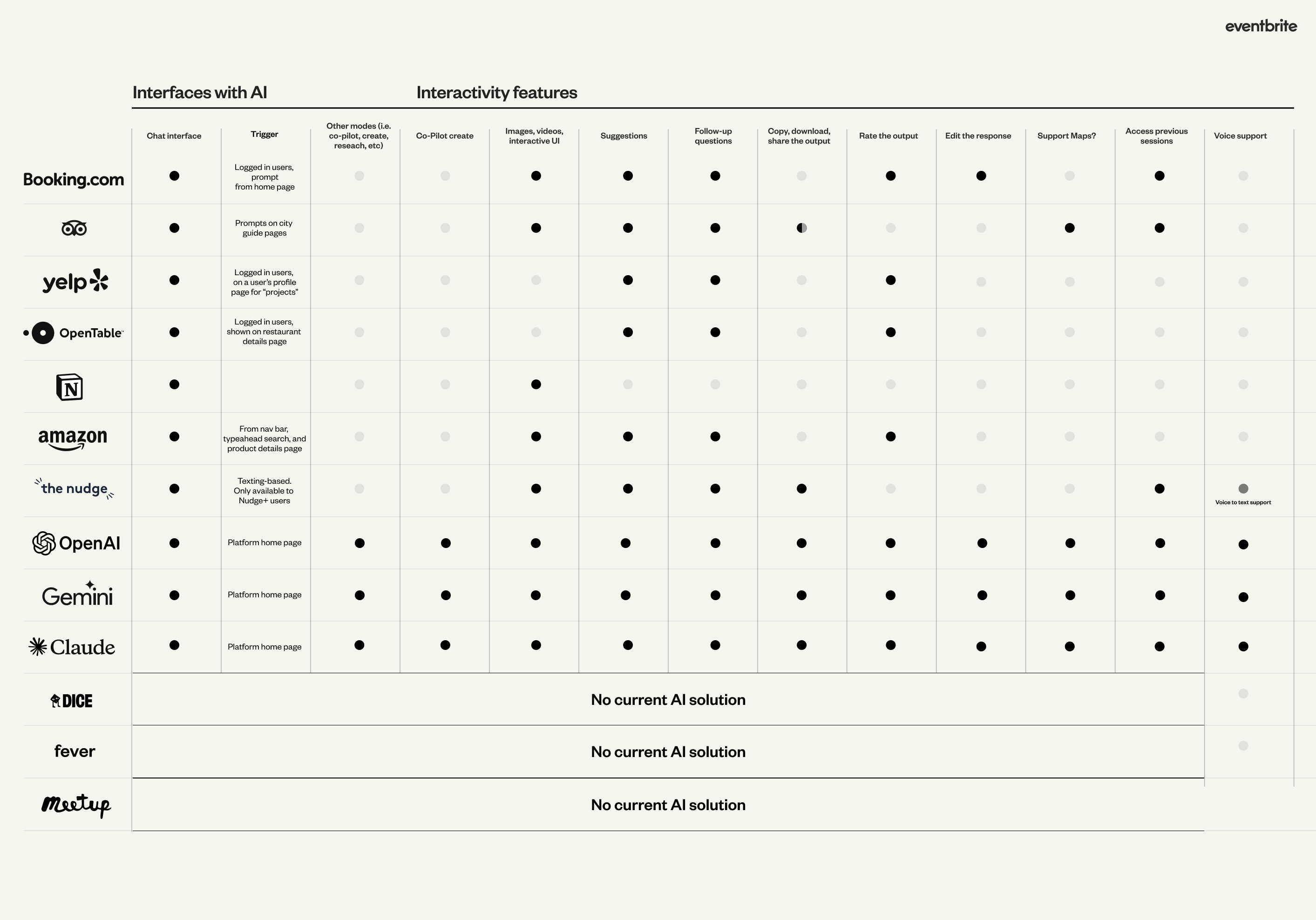
For the audit, I recorded the flow of comparable company AI/ML chats and mapped it back to common feature offerings. I also looked at best in-class experiences like OpenAI, Gemini, and Claude. I created the table above to take into product and development collaboration sessions to discuss how we could present our MVP that best met the expectations from a user and competitive standpoint. Here’s how this influenced our team’s thinking:

  • We were surprised by the lack of chat history. This was a flow I mocked up in my initial workflows, but something we thought we could bring to a later version.
  • We were also surprised by the lack of AI/ML chat in our event-finding space. It made us intrigued that we were one of the first players here.
  • Something we had to work through was how to support suggestions. This was something that the team thought it could punt on for a later version, but when I brought this audit to them, it was clear that we needed to be competitive with this particular feature.


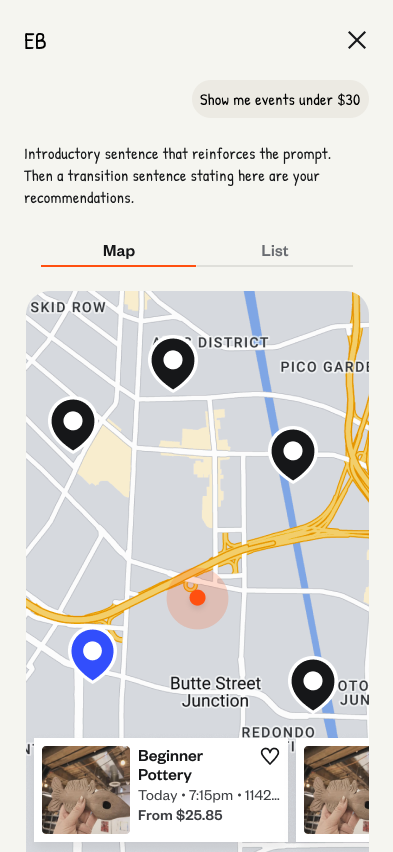
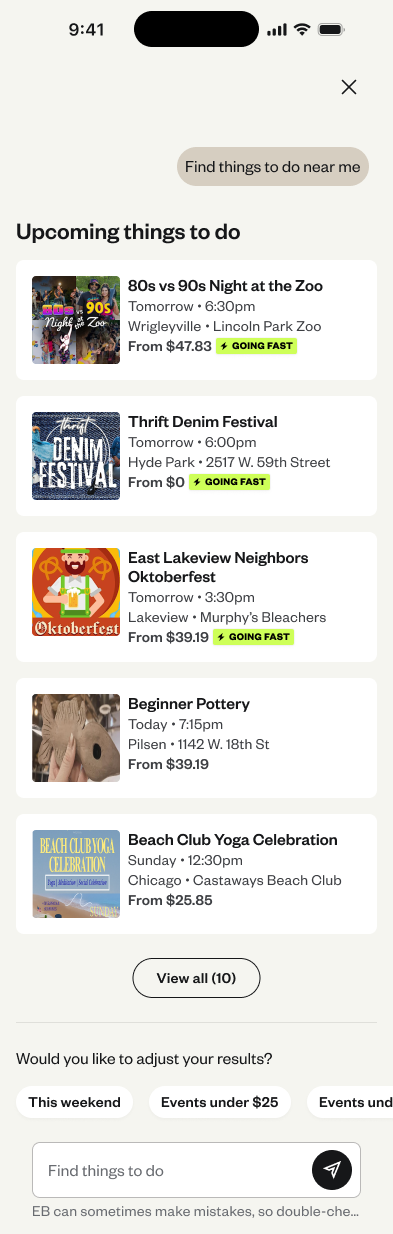
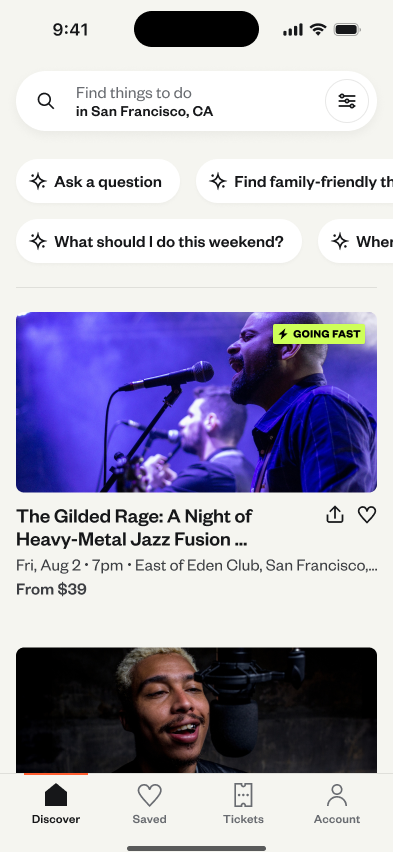
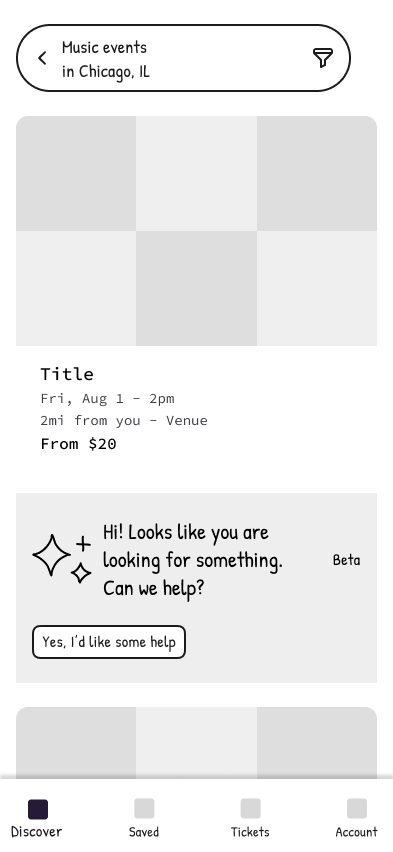
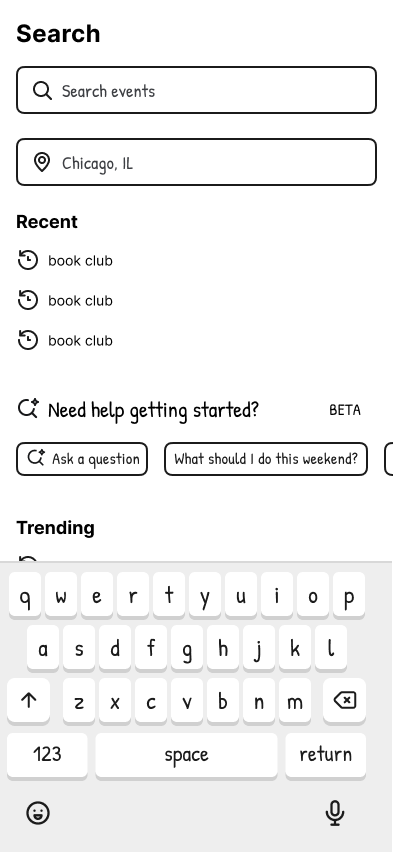
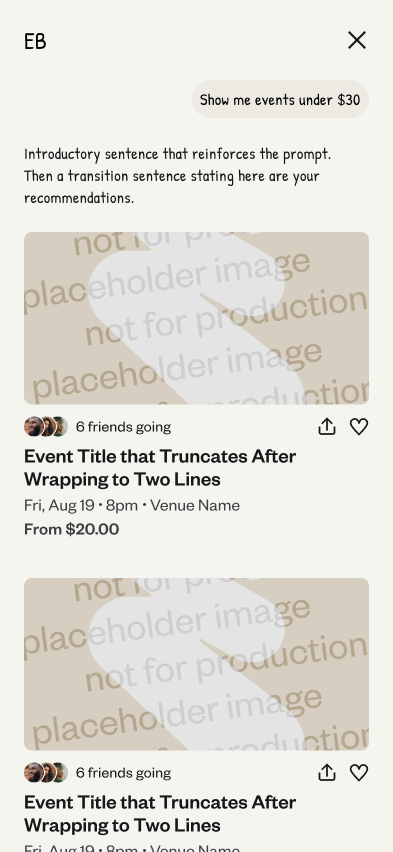
Next I explored different entry point and chat result options. I also put together some potential icon designs for the chat feature.

Wireframes
Research

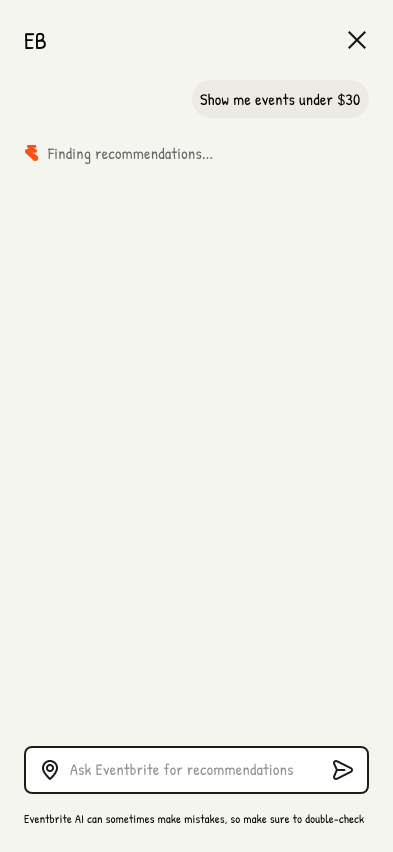
I worked with development to quickly prototype a version of our first experiment. I worked with Figma Make here to initially put together ideas to share with the team. A developer on the team took this initial prototype and created an environment a coded version that we could test with users (screenshot shown below). The main reason we wanted to test with this type of environment is we wanted the chat to feel as real as possible.


For the usability test we wanted to learn a couple main things. I collaborated with the PM of the team to craft these objectives:

  • Learn about user sentiment and trust in using AI tools to find events. 
  • Learn about how a chatbot type experience would fall in the process of finding events.


After putting up the test on UserTesting.com, we received responses from 8 of our target users - people that are 20-35 years old, actively search for events and things to do, and are the ones planning events with a group. After synthesizing the results, here were our main takeaways.


  • Users with higher intent prefer regular search.
  • Users had high expectations when using the AI tool. They were turned off by results thatwere not relevant.
  • Incorporate more trust into the events that are shown. Whether adding a AI summary of the event, or using badges to describe the event, we could do a better job showing more trust to users in the results.


With these takeaways in mind, we moved to our first experiment.


Here is the Figma Make prototype I took to developers. After showing this idea, development built their own prototype off this idea with actual event data, and this is what we took to usability testing. It was fun to see Figma Make generate cross-functional excitement and speed up iteration.

Experiment 1

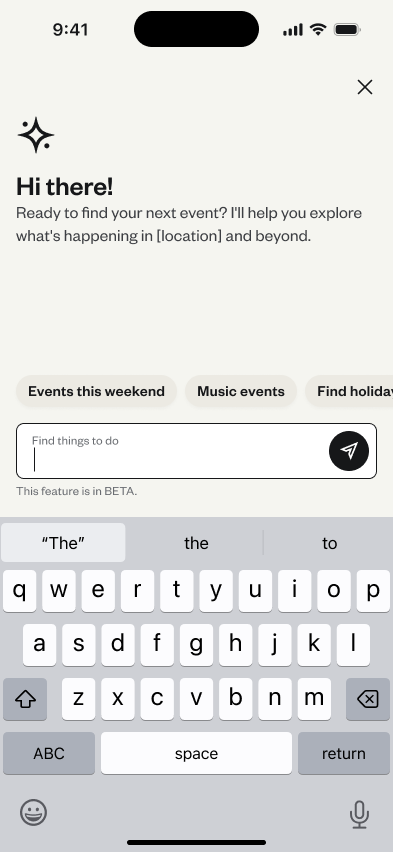
After collaborating with product, development, and engineering, we put together our first experiment experience. Our main metric was trying to move up paid tickets, and we were interested in learning more about how much activity would happen into the Natural Language Search model. Here is what we decided for the first test:


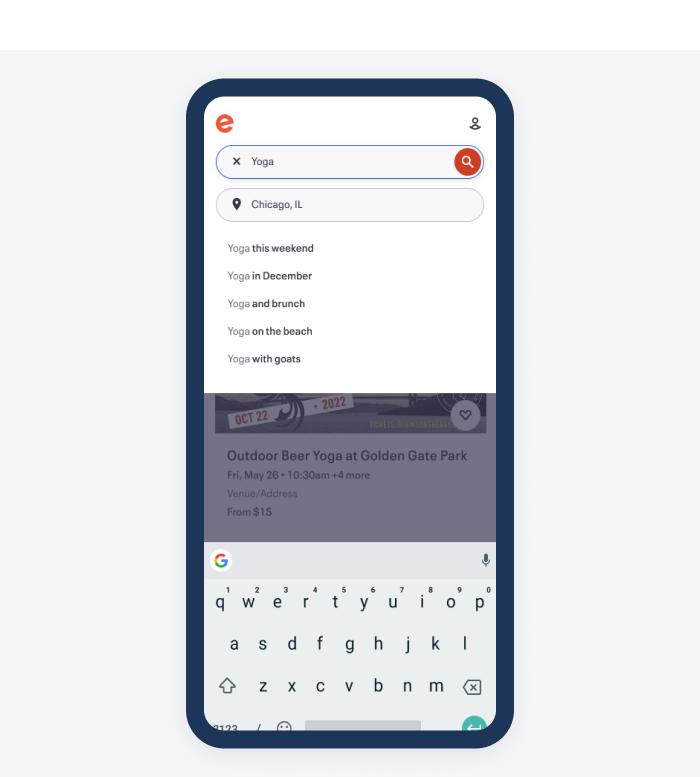
  • Introduced an AI chat entry point within the search takeover experience screen
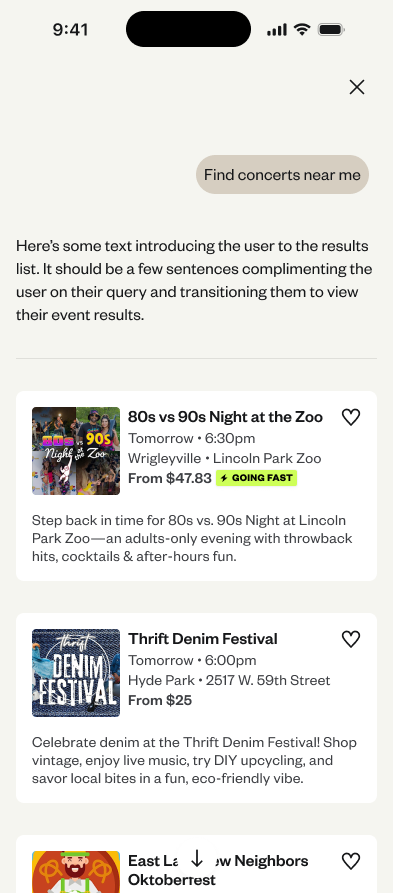
  • Designed onboarding, empty states, and conversational UI scenarios
  • Partnered with product and engineering to QA the designs and plan for LLM question and response scenarios.

Results: Only ~1% of users interacted from the search page entry point. Other usage data that was also interesting:

  • 37% of users that entered the chat selected an event listing page. That number from search is typically around 1-2%
  • User queries were most likely going to be 3 words
  • Users mostly entered queries that were time-based. Things like “What should I do this weekend?”

The clicks into the listing page raised eyebrows, especially with that number being so much larger than a typical search. We thought we should keep experimenting with the chat entry point, and continue improving the results that come back from the LLM.

Experiment 2

For experiment 2, we wanted to push the chat feature more up-front in the search and discovery process to see how much this would improve engagement. We were intrigued by the 37% click rate into events once they reached the chat page, and wanted to see if that remained true with the entry point being a toggle.


For this version I also worked with the design systems and brand team to get a chat color option available. This could be iterated on later, but it was thought that this could make things more enticing for the user as well.


Finally, we changed the card style for the results page to show off more of the event image. We had past UX research that imagery was the most important thing to users when initially deciding whether an event looked interesting.


Results:

  • Before additional experiments could launch, the company was acquired and new product development was significantly curtailed.
  • While the later versions did not ship:
    • Designs were production-ready
    • Insights were documented and shared
    • The work informed broader discussions around responsible AI investment

More projects

Eventbrite Categories

Explore

Eventbrite New Search

Explore

Hilton Meetings & Events

Explore

AI-Natural Language Search

An exploratory Eventbrite initiative to evaluate how conversational AI could help support search and improve discovery without disrupting user behavior.

Problem

The main users of Eventbrite, Social Scouts, love to plan and use Eventbrite events to hang out with friends, meet new people, and experience new things. In their discovery process, they often look for personalized inspiration, not just the most popular event.


In our research and qualitative data, we learned that while Social Scouts value discovery, they struggle to express what they’re looking for using traditional search tools:


  • Filtering and sorting seemed “rigid”, and didn’t always translate to what was intended.
  • Users iterated through multiple searches, applied what filtering we had, changed location - there was clear intent to running multiple queries to finding an event match.

Users wanting to find more personalized events counted for almost half of all comments about Eventbrite’s discovery surfaces.

Defining the Experiment

Our search team regularly operated in the world of A/B test experiments. Our team strategized together in working sessions - tweaking ideas, hypotheses, and I would show proposed designs. Given our knowledge of Social Scouts and their search/browse behaviors, we felt comfortable in coming up with the following hypotheses for the project:

  • IF we utilize LLMs and AI to power a more inspiring, flexible and conversational search experience THEN users will be better guided toward finding a great event BECAUSE they will have the ability to express their intent and increased confidence in finding the right event.


This would be our north star throughout the initiative.

Explorations

I needed to explore many things to get the team in position to test. The chat needed colors, an icon, an entry point, a comparative chat feature audit, and the chat design experience. I broke down each step from within Figma and got exploring.

Chat feature audit

Example 1 of music lineup exploration. Shows 2 headliners and a small treatment for other artists.

For the audit, I recorded the flow of comparable company AI/ML chats and mapped it back to common feature offerings. I also looked at best in-class experiences like OpenAI, Gemini, and Claude. I created the table above to take into product and development collaboration sessions to discuss how we could present our MVP that best met the expectations from a user and competitive standpoint. Here’s how this influenced our team’s thinking:

  • We were surprised by the lack of chat history. This was a flow I mocked up in my initial workflows, but something we thought we could bring to a later version.
  • We were also surprised by the lack of AI/ML chat in our event-finding space. It made us intrigued that we were one of the first players here.
  • Something we had to work through was how to support suggestions. This was something that the team thought it could punt on for a later version, but when I brought this audit to them, it was clear that we needed to be competitive with this particular feature.


Next I explored different entry point and chat result options. I also put together some potential icon designs for the chat feature.

Wireframes
Research

I worked with development to quickly prototype a version of our first experiment. I worked with Figma Make here to initially put together ideas to share with the team. A developer on the team took this initial prototype and created an environment a coded version that we could test with users. The main reason we wanted to test with this type of environment is we wanted the chat to feel as real as possible.


For the usability test we wanted to learn a couple main things. I collaborated with the PM of the team to craft these objectives:

  • Learn about user sentiment and trust in using AI tools to find events. 
  • Learn about how a chatbot type experience would fall in the process of finding events.


After putting up the test on UserTesting.com, we received responses from 8 of our target users - people that are 20-35 years old, actively search for events and things to do, and are the ones planning events with a group. After synthesizing the results, here were our main takeaways.


  • Users with higher intent prefer regular search.
  • Users had high expectations when using the AI tool. They were turned off by results thatwere not relevant.
  • Incorporate more trust into the events that are shown. Whether adding a AI summary of the event, or using badges to describe the event, we could do a better job showing more trust to users in the results.


With these takeaways in mind, we moved to our first experiment.


Here is the Figma Make prototype I took to developers. After showing this idea, development built their own prototype off this idea with actual event data, and this is what we took to usability testing. It was fun to see Figma Make generate cross-functional excitement and speed up iteration.

Experiment 1

After collaborating with product, development, and engineering, we put together our first experiment experience. Our main metric was trying to move up paid tickets, and we were interested in learning more about how much activity would happen into the Natural Language Search model. Here is what we decided for the first test:


  • Introduced an AI chat entry point within the search takeover experience screen
  • Designed onboarding, empty states, and conversational UI scenarios
  • Partnered with product and engineering to QA the designs and plan for LLM question and response scenarios.

Results: Only ~1% of users interacted from the search page entry point. We were surprised by the small amount of traffic, but did find other interesting usage data:

  • 37% of users that entered the chat selected an event listing page. That number from search is typically around 1-2%
  • User queries were most likely going to be 3-5 words, longer than the typical search query.
  • Users mostly entered queries that were time-based. Things like “What should I do this weekend?”

The clicks into the listing page raised eyebrows, especially with that number being so much larger than a typical search. We thought we should keep experimenting with the chat entry point, and continue improving the results that come back from the LLM.

Experiment 2

For experiment 2, we wanted to push the chat feature more up-front in the search and discovery process to see how much this would improve engagement. We were intrigued by the 37% click rate into events once they reached the chat page, and wanted to see if that remained true with the entry point being a toggle.


For this version I also worked with the design systems and brand team to get a chat color option available. This could be iterated on later, but it was thought that this could make things more enticing for the user as well.


Finally, we changed the card style for the results page to show off more of the event image. We had past UX research that imagery was the most important thing to users when initially deciding whether an event looked interesting.


Results:

  • Before additional experiments could launch, the company was acquired and new product development was significantly curtailed.
  • While the later versions did not ship:
    • Designs were production-ready
    • Insights were documented and shared
    • The work informed broader discussions around responsible AI investment

More projects

abstract painting

Eventbrite Categories

Explore

Eventbrite New Search

Explore

Hilton Meetings & Events

Explore

AI-Natural Language Search

An exploratory Eventbrite initiative to evaluate how conversational AI could help support search and improve discovery without disrupting user behavior.

Problem

The main users of Eventbrite, Social Scouts, love to plan and use Eventbrite events to hang out with friends, meet new people, and experience new things. In their discovery process, they often look for personalized inspiration, not just the most popular event.


In our research and qualitative data, we learned that while Social Scouts value discovery, they struggle to express what they’re looking for using traditional search tools:


  • Filtering and sorting seemed “rigid”, and didn’t always translate to what was intended.
  • Users iterated through multiple searches, applied what filtering we had, changed location - there was clear intent to running multiple queries to finding an event match.

Users wanting to find more personalized events counted for almost half of all comments about Eventbrite’s discovery surfaces.

Defining the Experiment

Our search team regularly operated in the world of A/B test experiments. Our team strategized together in working sessions - tweaking ideas, hypotheses, and I would show proposed designs. Given our knowledge of Social Scouts and their search/browse behaviors, we felt comfortable in coming up with the following hypotheses for the project:

  • IF we utilize LLMs and AI to power a more inspiring, flexible and conversational search experience THEN users will be better guided toward finding a great event BECAUSE they will have the ability to express their intent and increased confidence in finding the right event.


This would be our north star throughout the initiative.

Explorations

I needed to explore many things to get the team in position to test. The chat needed colors, an icon, an entry point, a comparative chat feature audit, and the chat design experience. I broke down each step from within Figma and got exploring.

Chat feature audit

Example 1 of music lineup exploration. Shows 2 headliners and a small treatment for other artists.

For the audit, I recorded the flow of comparable company AI/ML chats and mapped it back to common feature offerings. I also looked at best in-class experiences like OpenAI, Gemini, and Claude. I created the table above to take into product and development collaboration sessions to discuss how we could present our MVP that best met the expectations from a user and competitive standpoint. Here’s how this influenced our team’s thinking:

  • We were surprised by the lack of chat history. This was a flow I mocked up in my initial workflows, but something we thought we could bring to a later version.
  • We were also surprised by the lack of AI/ML chat in our event-finding space. It made us intrigued that we were one of the first players here.
  • Something we had to work through was how to support suggestions. This was something that the team thought it could punt on for a later version, but when I brought this audit to them, it was clear that we needed to be competitive with this particular feature.


Next I explored different entry point and chat result options. I also put together some potential icon designs for the chat feature.

Wireframes
Research

I worked with development to quickly prototype a version of our first experiment. I worked with Figma Make here to initially put together ideas to share with the team. A developer on the team took this initial prototype and created an environment a coded version that we could test with users. The main reason we wanted to test with this type of environment is we wanted the chat to feel as real as possible.


For the usability test we wanted to learn a couple main things. I collaborated with the PM of the team to craft these objectives:

  • Learn about user sentiment and trust in using AI tools to find events. 
  • Learn about how a chatbot type experience would fall in the process of finding events.


After putting up the test on UserTesting.com, we received responses from 8 of our target users - people that are 20-35 years old, actively search for events and things to do, and are the ones planning events with a group. After synthesizing the results, here were our main takeaways.


  • Users with higher intent prefer regular search.
  • Users had high expectations when using the AI tool. They were turned off by results thatwere not relevant.
  • Incorporate more trust into the events that are shown. Whether adding a AI summary of the event, or using badges to describe the event, we could do a better job showing more trust to users in the results.


With these takeaways in mind, we moved to our first experiment.
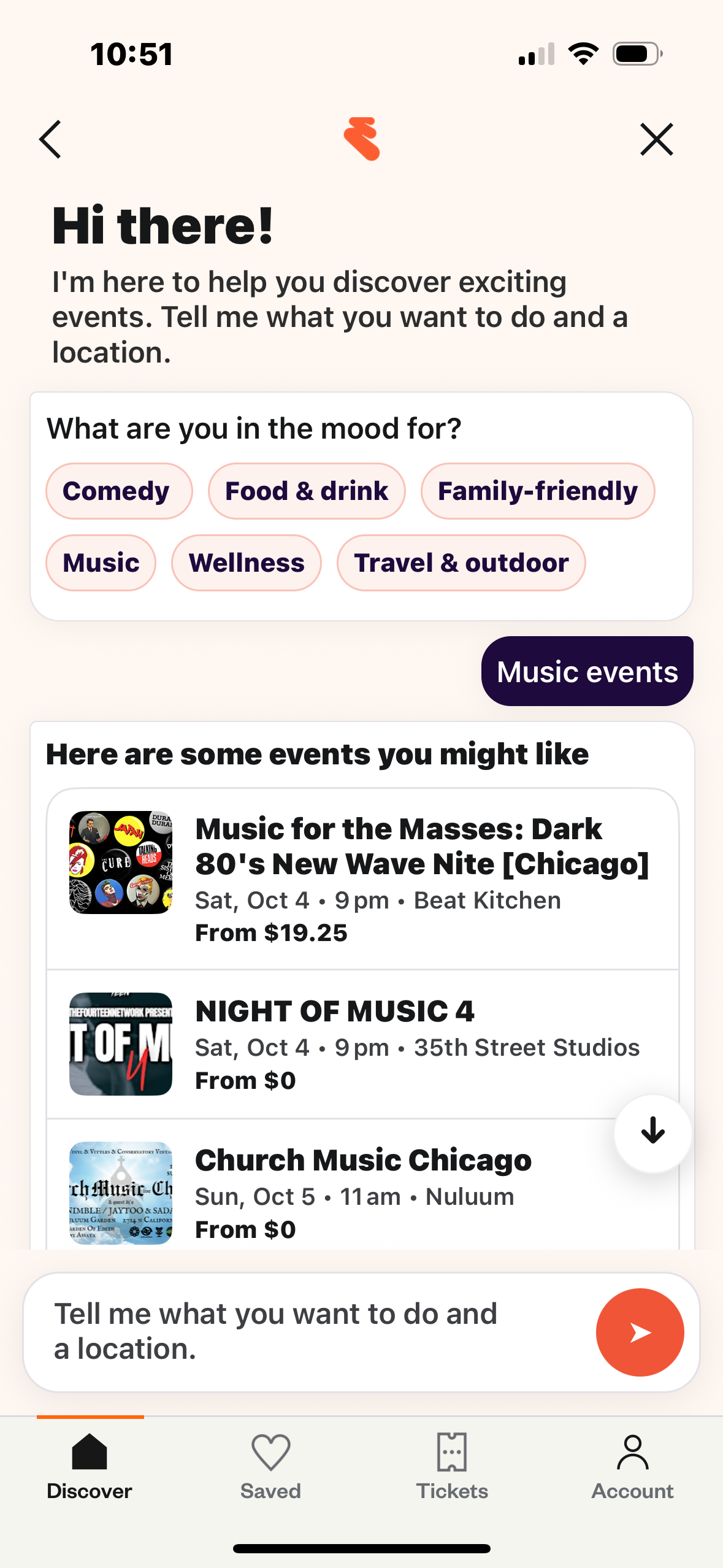


Here is the Figma Make prototype I took to developers. After showing this idea, development built their own prototype off this idea with actual event data, and this is what we took to usability testing. It was fun to see Figma Make generate cross-functional excitement and speed up iteration.

Experiment 1

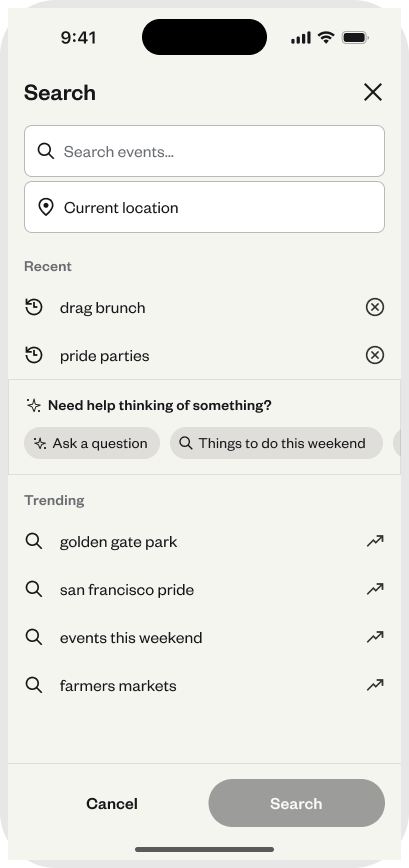
After collaborating with product, development, and engineering, we put together our first experiment experience. Our main metric was trying to move up paid tickets, and we were interested in learning more about how much activity would happen into the Natural Language Search model. Here is what we decided for the first test:


  • Introduced an AI chat entry point within the search takeover experience screen
  • Designed onboarding, empty states, and conversational UI scenarios
  • Partnered with product and engineering to QA the designs and plan for LLM question and response scenarios.
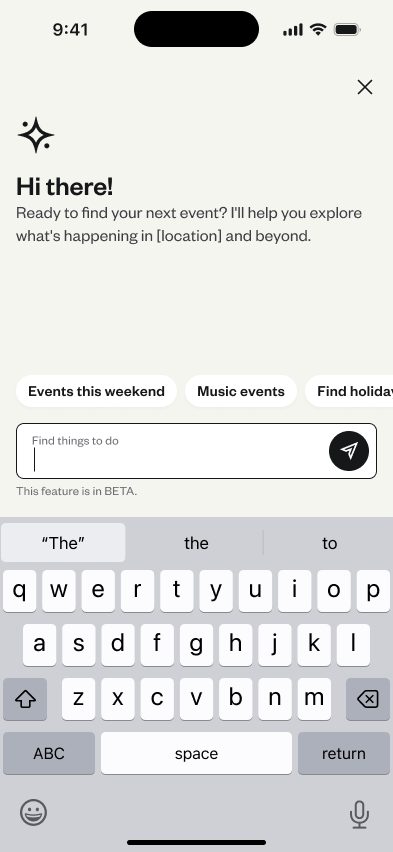
Results: Only ~1% of users interacted from the search page entry point. We were surprised by the small amount of traffic, but did find other interesting usage data:

  • 37% of users that entered the chat selected an event listing page. That number from search is typically around 1-2%
  • User queries were most likely going to be 3-5 words, longer than the typical search query.
  • Users mostly entered queries that were time-based. Things like “What should I do this weekend?”

The clicks into the listing page raised eyebrows, especially with that number being so much larger than a typical search. We thought we should keep experimenting with the chat entry point, and continue improving the results that come back from the LLM.

Experiment 2

For experiment 2, we wanted to push the chat feature more up-front in the search and discovery process to see how much this would improve engagement. We were intrigued by the 37% click rate into events once they reached the chat page, and wanted to see if that remained true with the entry point being a toggle.


For this version I also worked with the design systems and brand team to get a chat color option available. This could be iterated on later, but it was thought that this could make things more enticing for the user as well.


Finally, we changed the card style for the results page to show off more of the event image. We had past UX research that imagery was the most important thing to users when initially deciding whether an event looked interesting.


Results:

  • Before additional experiments could launch, the company was acquired and new product development was significantly curtailed.
  • While the later versions did not ship:
    • Designs were production-ready
    • Insights were documented and shared
    • The work informed broader discussions around responsible AI investment

More projects

abstract painting

Eventbrite Categories

Explore

magazine spread

Eventbrite New Search

Explore

Hilton Meetings & Events

Explore